POS Shift Reports
Every POS shift, opened by a cashier and closed at the end of the day, produces a shift report: how much was rung up, how much cash should be in the drawer, and what the variance is. This page is your audit view across every device and every store. Navigate to Operations > POS Shifts in the dashboard. About 3 minutes.
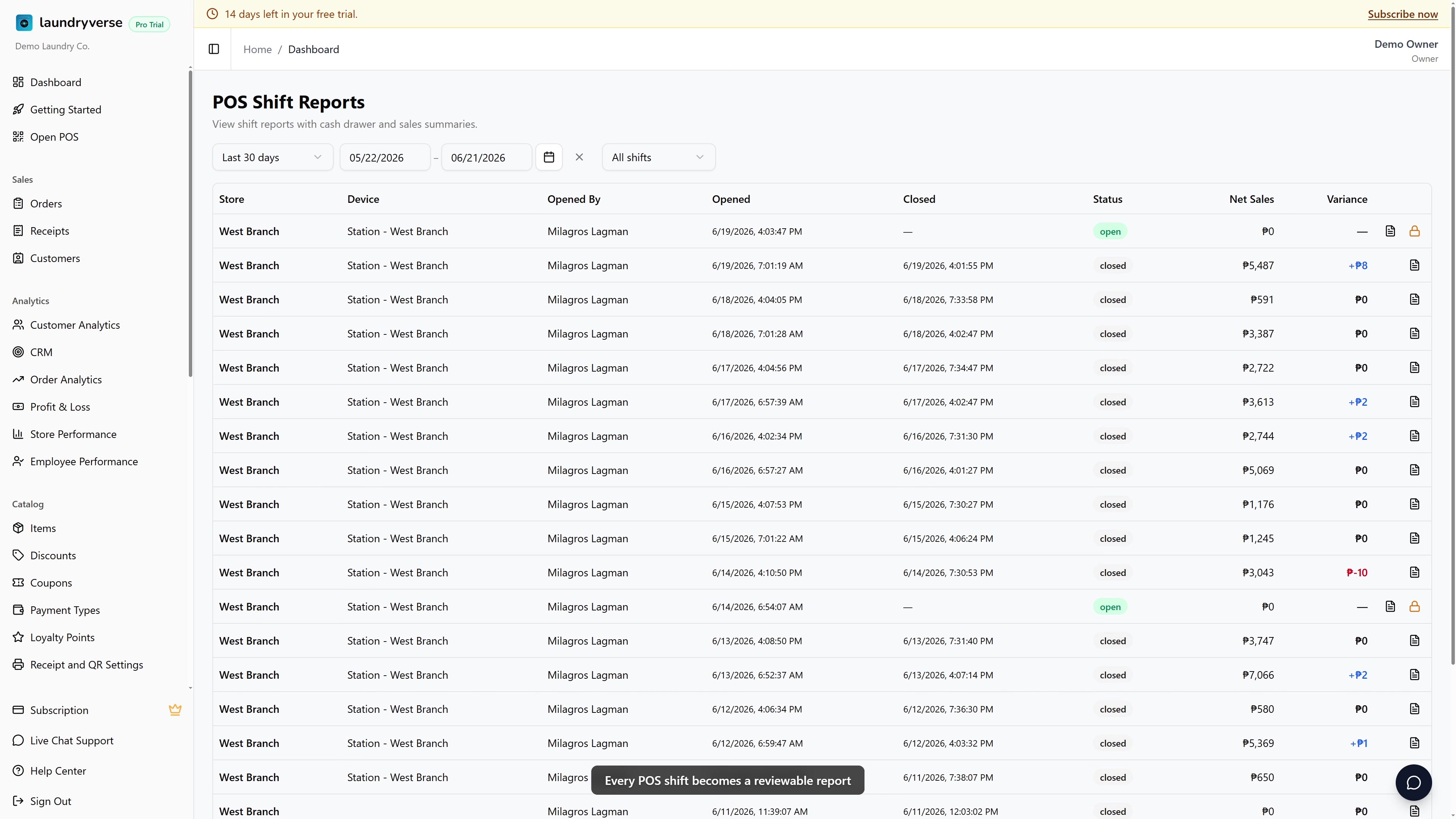
Viewing POS shift reports requires the Manage vault permission (vault:manage). Owners, Admins, and Managers have it by default. Grant it to other roles in Dashboard → Roles & Permissions. Without this permission, the POS Shifts entry stays hidden and any direct visit is blocked at the server.
Before you start
Shifts only appear here after a cashier has opened them at the POS register. A brand new shop with no register activity yet will see an empty table. If you want to know how cashiers open, record cash movements, and close a shift, see the POS Shifts employee guide.
You count and reconcile cash on the POS itself, at the register. This dashboard page is for reviewing what already happened: net sales, variance, and the printed report for any past shift. The one exception is force-closing an orphaned shift, covered in section 6.
1. What's a Shift?
A POS shift starts when a cashier signs into a device and opens it with starting cash, and ends when they close out. Everything that happens in between, including sales, refunds, pay-ins, pay-outs, and cash drawer kicks, gets attached to that shift.
The POS Shift Reports page lists every shift, open or closed, so you can spot variance, compare cashiers, or pull a specific report for review.
| What this page is for | What it's not for |
|---|---|
| Reviewing a closed shift's net sales and variance | Counting cash live (use the POS itself) |
| Pulling the printed shift report from any past shift | Editing the cash count after the fact |
| Confirming all shifts closed at end of day | Operational signals (use the POS Shifts screen) |
2. The Table
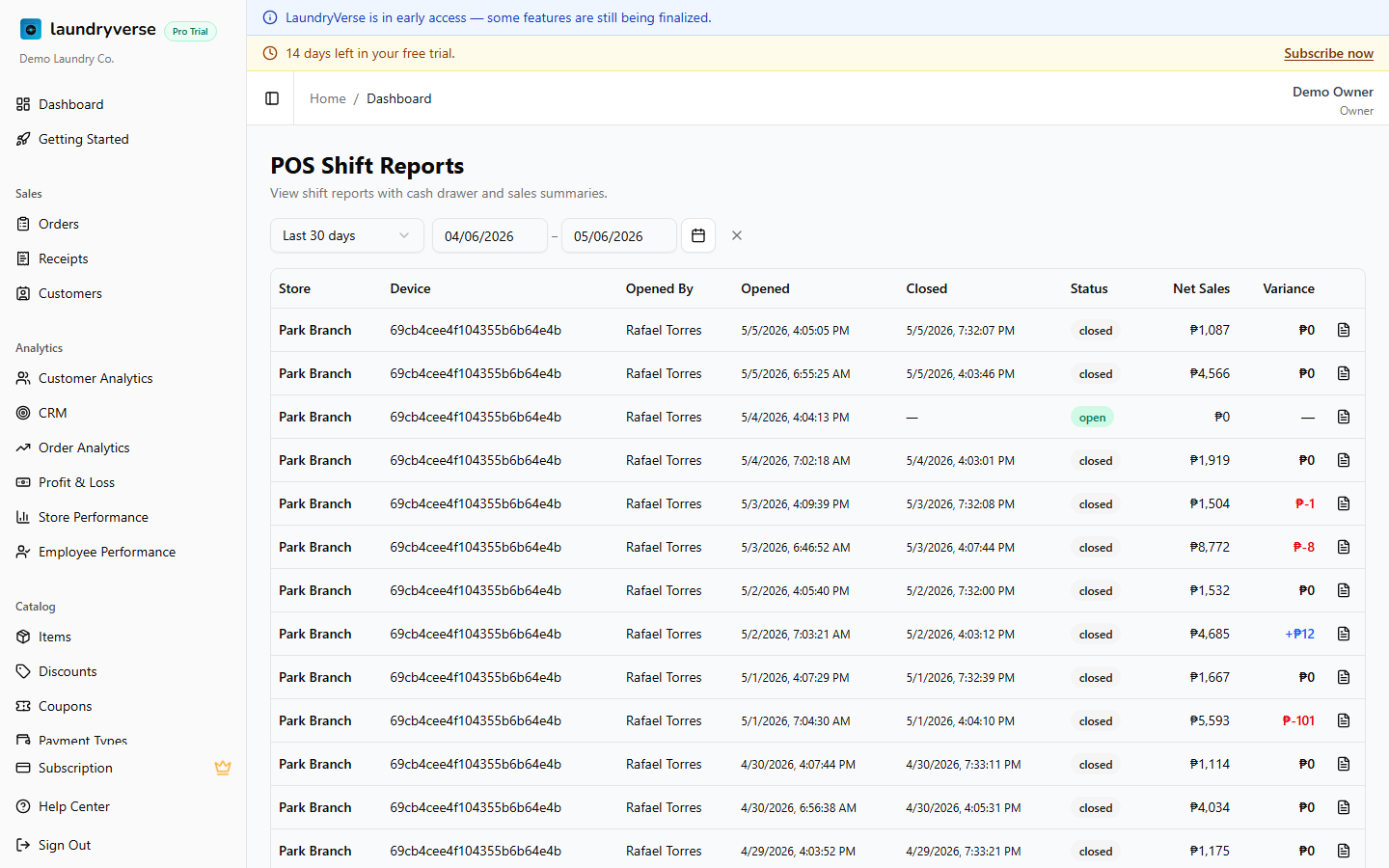
Each row is one shift:
| Column | Description |
|---|---|
| Store | Branch the shift was opened at |
| Device | Specific POS terminal |
| Opened By | Cashier who opened the shift |
| Opened / Closed | Date and time stamps |
| Status | open (still active, currently logged in) or closed |
| Net Sales | Total receipts rung up during the shift, less refunds |
| Variance | Counted cash minus expected cash. Positive (blue) is a surplus; negative (red) is short |
Variance only shows on closed shifts, because it can't be computed until the cashier counts. A shift with no variance value is currently still open.
3. Filters
- Date Range defaults to the last 30 days. Change it for monthly audits or longer ranges.
- Store switches via the global Store filter at the top of the dashboard. It affects every page.
4. Shift Report Dialog
Click the document icon at the right end of any row to open the full shift report:
- Cash drawer: opening cash, expected cash, counted cash, variance
- Sales: broken down by payment type (Cash, GCash, bank transfer, and so on)
- Pay-ins and pay-outs: cash added or removed during the shift, with reasons
- Adjustments and drawer kicks: every drawer-open event during the shift
- Cashier: name, sign-in time, sign-out time, and shift duration
The dialog mirrors the receipt the POS prints when the cashier closes the shift. Reprint from this dialog if a paper copy got lost.
5. Reading Variance
| Variance | Likely cause |
|---|---|
| Small surplus | Customer rounded up a tip, or a pay-in was understated |
| Small shortage | Counting error or change miscounted |
| Large surplus | Cashier kept a tip in the drawer, or a refund was processed but not recorded |
| Large shortage | Missing receipt, drawer skim, or untracked pay-out. Investigate. |
Recurring variance from the same cashier in the same direction is a coaching, or HR, signal. Use the Activity Log Employee tab to cross-reference what they did during the shift.
6. Open Shifts at End of Day
A shift that still shows open after closing time means a cashier didn't close out before walking away. The next morning's opening cashier on the same device inherits whatever's in the drawer, so the variance gets attributed to whoever opens next.
Train cashiers to always close their shift before logging out. If a shift can't be reached from the POS, for example because the device was removed or the cashier abandoned the session, a user with the Manage vault permission can force-close it from this page: open the shift, record the counted cash and a reason, and the dashboard stamps that note onto the shift for audit. Use the Activity Log Employee tab to confirm what happened during the shift.
Common issues
"The POS Shifts page won't load"
Loading this page requires the Manage vault permission. Owners, Admins, and Managers have it by default. If a staff member is blocked, open Dashboard → Roles & Permissions and grant Manage vault to their role.
"A shift shows no variance value"
That shift is still open. Variance is the counted cash minus the expected cash, and the count only happens when the cashier closes out at the register. Once the shift is closed, the variance fills in.
"A shift has been open for days"
The cashier logged out without closing the shift. Have them close it at the register, or force-close it from this page if the device or session is gone. See section 6.
"The table is empty"
No shifts match the current filters. Widen the Date Range (the default only covers the last 30 days) and check the global Store filter at the top of the dashboard. If the shop has never opened a shift at the POS, there's nothing to show yet.
"I need a paper copy of an old shift report"
Open the shift with the document icon and reprint from the dialog. It mirrors the receipt the POS printed when the cashier closed the shift.
"The numbers here don't match what the cashier counted"
This page reports what was recorded at close. If a payment was rung up on the wrong type, or a pay-in or pay-out was missed, the variance reflects that gap. Cross-reference the Activity Log Employee tab to see every receipt, pay-in, and pay-out for that cashier during the shift.
What's next?
- POS Shifts (employee guide): how cashiers open, record cash movements, and close out their shifts.
- Activity Log: the Employee tab cross-references every receipt, pay-in, and pay-out.
- Payment Types: set up the payment methods that drive the per-type sales breakdown.
- Receipts: review the individual sales that make up a shift's net total.
Stuck? Email [email protected]. The founder reads every message.