CRM
Segment your customers by visit frequency and churn risk, then send targeted SMS campaigns to the segments that move revenue. Navigate to Sales > CRM in the dashboard.
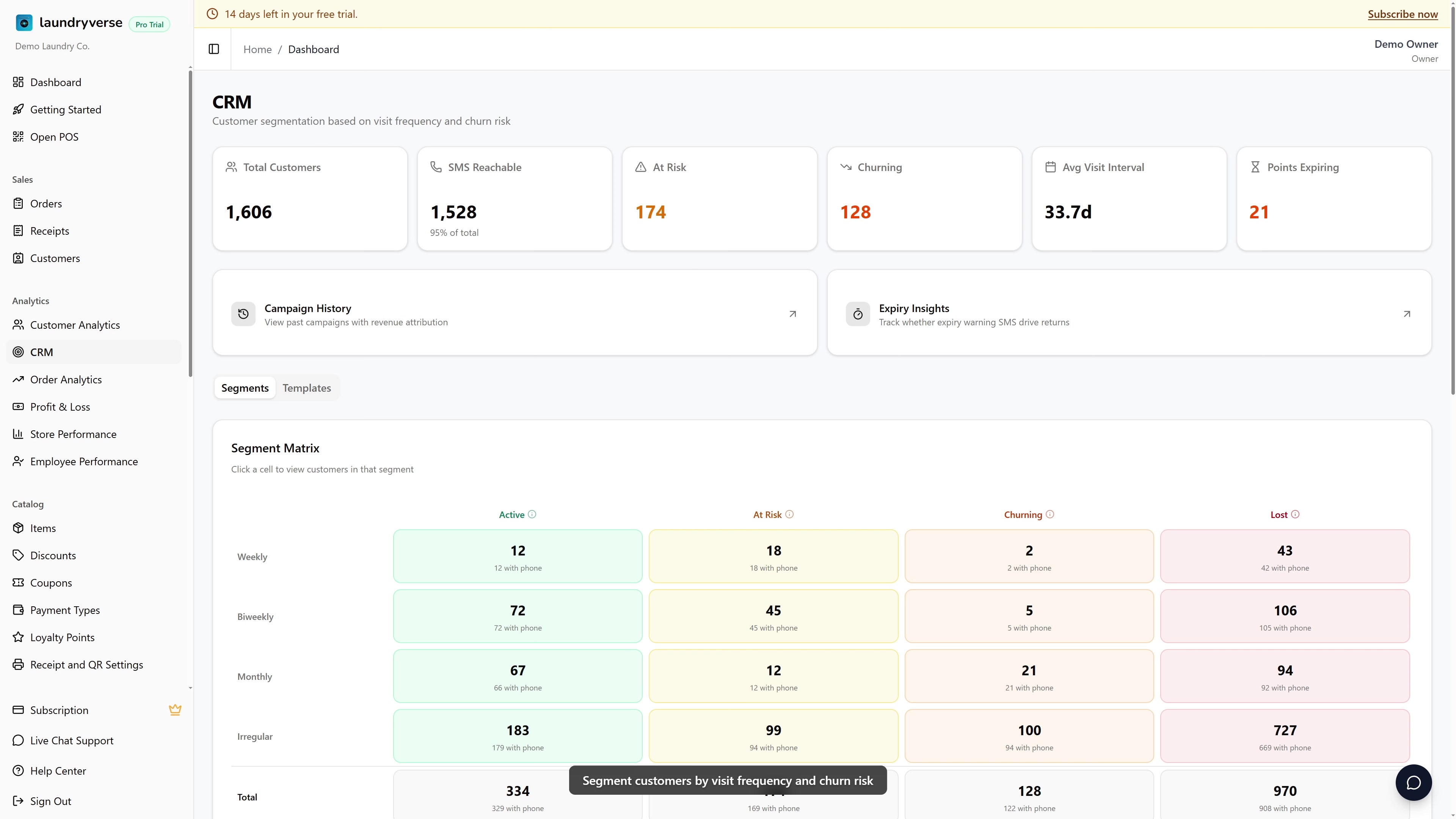
Customer segmentation and KPI cards are available on Business and above. SMS Campaigns require Pro or above, plus an approved sender name with the SMS provider before any message can actually go out.
1. Segment Matrix (the centerpiece)
A 4×4 grid that buckets every customer with at least 1 receipt:
| Active | At Risk | Churning | Lost | |
|---|---|---|---|---|
| Weekly | … | … | … | … |
| Biweekly | … | … | … | … |
| Monthly | … | … | … | … |
| Irregular | … | … | … | … |
- Frequency tiers (rows) — typical interval between visits, derived from the customer's own receipt history
- Weekly — visits about every week
- Biweekly — visits roughly every 2 weeks
- Monthly — visits about once a month
- Irregular — no clear cadence (one-time customers, sporadic returners)
- Churn segments (columns):
- Active — visited within the expected interval
- At Risk — slightly past their usual return time
- Churning — well past return time, but still salvageable
- Lost — long gone, treat as cold reactivation
Click any cell to filter the Customers table below. Click a column header (e.g. "At Risk") to filter to all tiers in that segment — useful when you want to send a "we miss you" SMS to everyone slipping away regardless of frequency.
2. KPI Cards
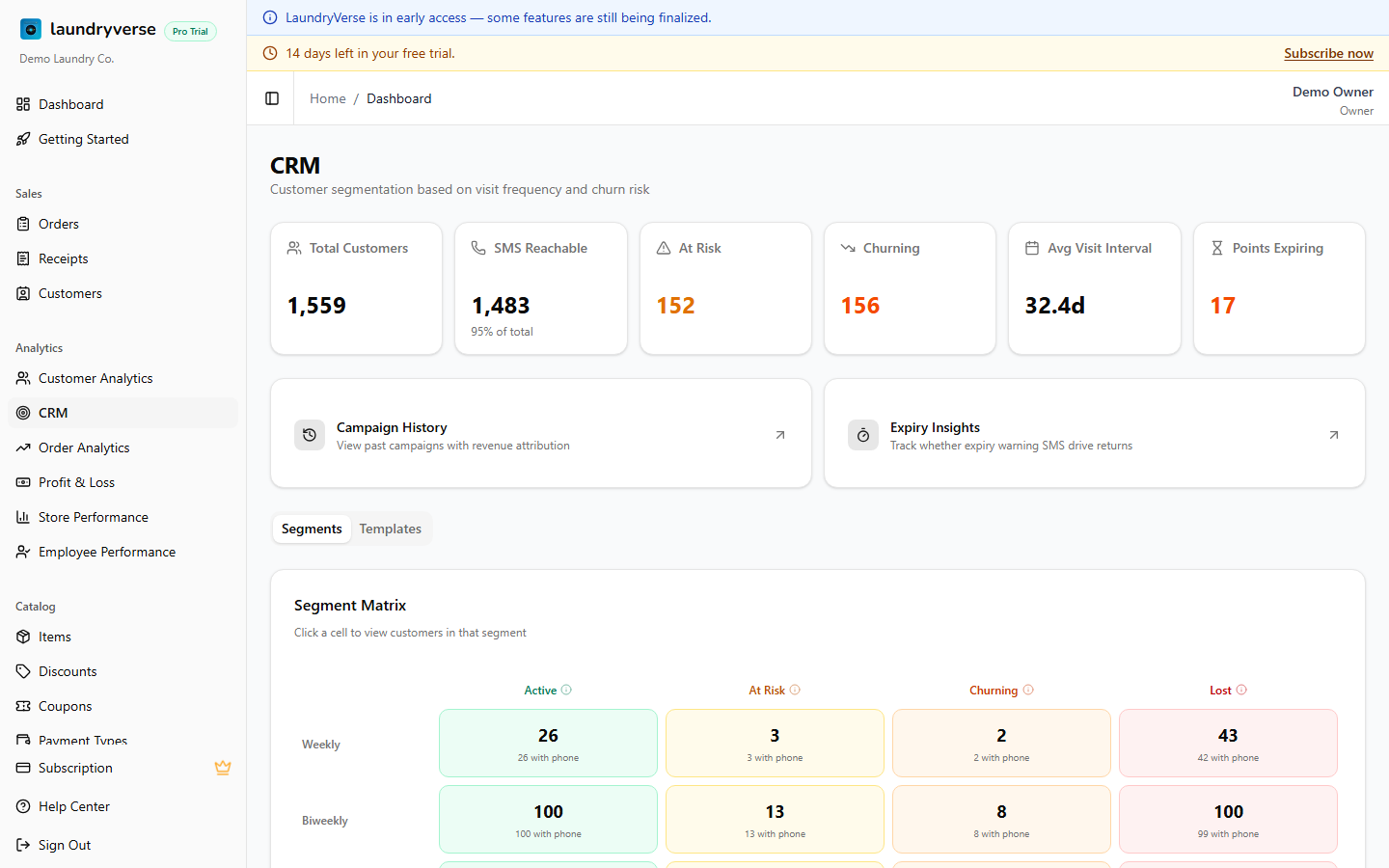
Above the matrix, six KPIs frame the picture:
| KPI | What it tells you |
|---|---|
| Total Customers | Lifetime customer count |
| SMS Reachable | How many have a phone number on file (your real audience size for SMS) |
| At Risk Count | Customers slipping toward churn |
| Churning Count | Customers in deep churn — high-priority outreach |
| Avg Visit Interval | Average days between visits across your base. Useful for setting reminder cadence |
| Points Expiring Soon | Loyalty points that will expire in the next 30 days — opportunity for redemption nudges |
3. Sending an SMS Campaign
Pick a segment cell (or the "All" view), then tap Send SMS above the customers table.
The dialog shows:
- Recipient count — total in the segment, and how many have a phone number (only those get the SMS)
- Template picker — start from a saved template, or compose from scratch
- Message body — supports placeholders:
{name},{branch},{points}. Preview shows a sample render - Coupon attach (optional) — link to a unique-codes Coupons campaign so each recipient gets their own redeemable code, with attribution back to this send
- Schedule — Send Now, or schedule for a specific date/time
Sending requires an approved sender name registered with the SMS provider — without one, the send fails on the provider side.
The planned billing model is ₱300/month for the sender name and ₱0.60 per SMS credit (1 credit = 1 SMS). Credit-based enforcement is being rolled out — until then, send activity is tracked but not metered against a balance.
4. SMS Templates Tab
Saved message templates so you don't rewrite copy each campaign. Click Templates to:
- Add a template — name + body + placeholder support
- Edit / delete an existing template
- Mark a template as the default for a segment (e.g. "Churning Welcome Back" defaults for the Churning column)
Templates persist across campaigns and stores.
5. Campaign History
Click Campaign History in the navigation cards near the top. The history page shows every past campaign:
| Column | What it shows |
|---|---|
| Sent At | When the send was triggered |
| Recipients | How many got the SMS (with phone) |
| Delivery Rate | Sent vs delivered (Sombra delivery report) |
| Coupon | Linked coupon campaign, if any |
| Revenue Attributed | Total receipts from recipients in the 7 days after send |
| ROI | Revenue Attributed ÷ SMS cost |
Use this to figure out which segment + message combo actually moves money.
6. Expiry Insights
Click Expiry Insights in the navigation cards. Tracks whether your "your points expire soon" SMS actually drive returns:
- Sent count — how many warning SMS went out
- Returned within 30 days — how many of those recipients made a transaction
- Conversion rate — return-rate of warned customers vs unwarned baseline
7. Customers Table
Below the matrix, a paginated table of customers in the selected segment (or all if no cell is selected):
- Filterable by name, phone, points balance, last visit date
- Sortable by spend, visits, or last seen
- Each row links back to the Customers detail page
What's Next?
- Customers — Per-customer detail, edit phone numbers, see receipt history
- Coupons — Unique-codes campaigns to attach to SMS for attribution
- SMS — Sender name, credits balance, top-up
- Customer Analytics — Top spenders + retention curve