Activity Log
The audit trail for everything that happened in your account: every cashier action at the POS, every system-driven event, and every admin or owner login and settings change. Navigate to Operations > Activity Log in the dashboard. About 2 minutes.
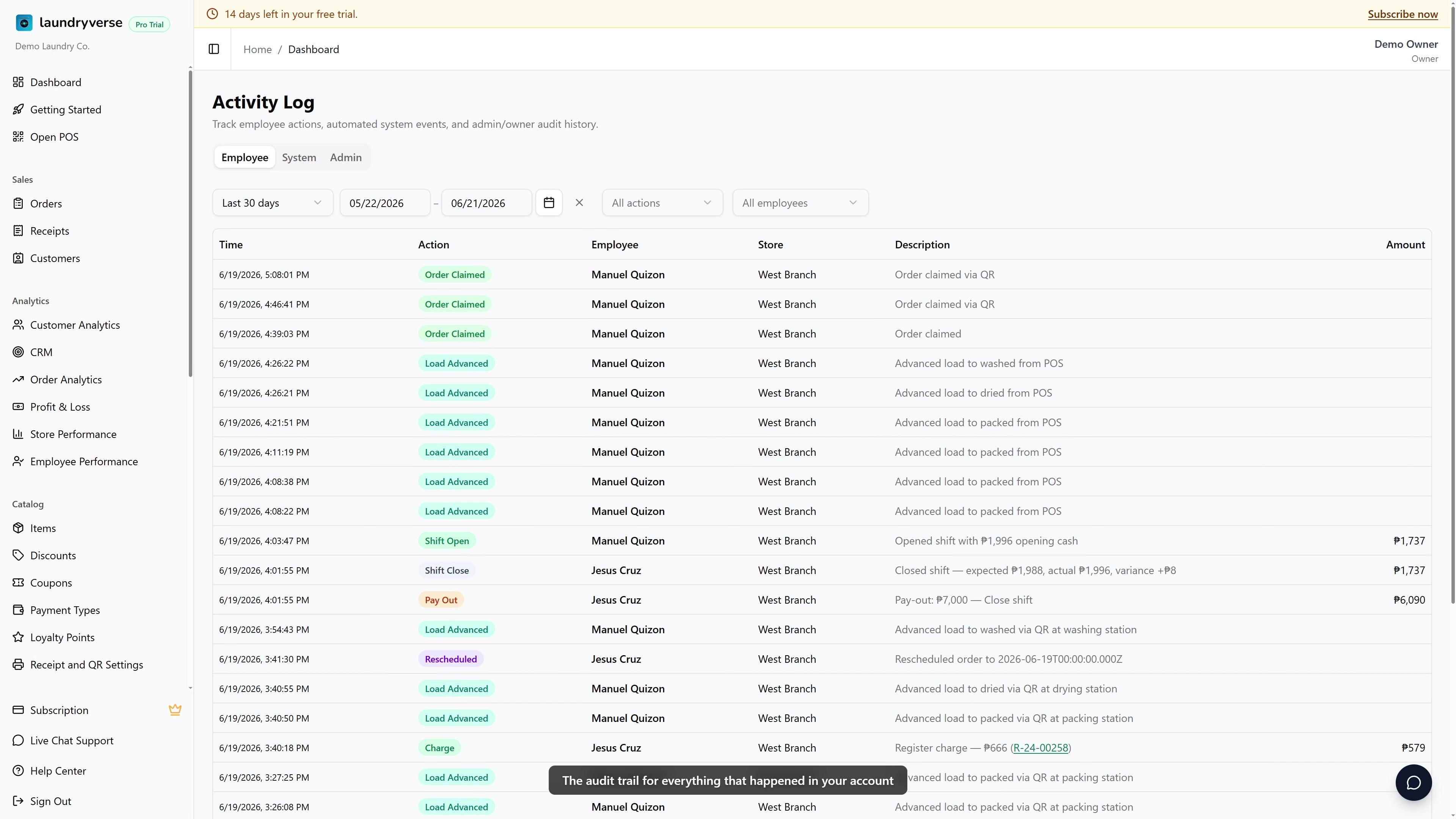
Viewing the Activity Log requires the Sign in to dashboard permission (dashboard:view), the same one needed to open the dashboard at all. Owners, Admins, and Managers have it by default; Cashiers don't have dashboard access. Grant access to other roles in Dashboard → Roles & Permissions.
Before you start
The Activity Log starts recording from the moment your account is created, so there's nothing to set up. It captures three streams: cashier actions at the POS, automated system events, and admin or owner audit history. The log is append-only, meaning entries can't be edited or deleted, which is what makes it trustworthy in a dispute. Nothing ages out: older entries stay stored, they're just paged out of view by the date filter.
The Activity Log is a tool for the rare moment something looks off. If a receipt was voided, a reminder went quiet, or a setting changed without explanation, this is where the answer usually lives.
1. When You'll Use This
Most days, never. When you need it:
- Disputes: "Who voided that ₱2,400 receipt yesterday?"
- Mystery cancels: A reminder is paused but nobody admits it
- Suspected fraud: Pay-out for ₱500, no manager around
- Settings drift: Loyalty rate changed, you didn't change it
- Onboarding new staff: See exactly what trainees did during their first shift
If something looks off, the answer is usually here.
2. Three Tabs
| Tab | What's logged | Examples |
|---|---|---|
| Employee | Cashier actions at the POS | Receipt cancelled, pay-out recorded, discount applied, customer attached, drawer opened |
| System | Automated events | SMS delivered, scheduled reminder fired, daily cron rolled the receipt counter, webhook from PayMongo received |
| Admin | Owner, admin, or impersonated-admin actions | Sign-in, subscription change, settings edit, employee role changed, password reset, support agent impersonation |
3. Filtering
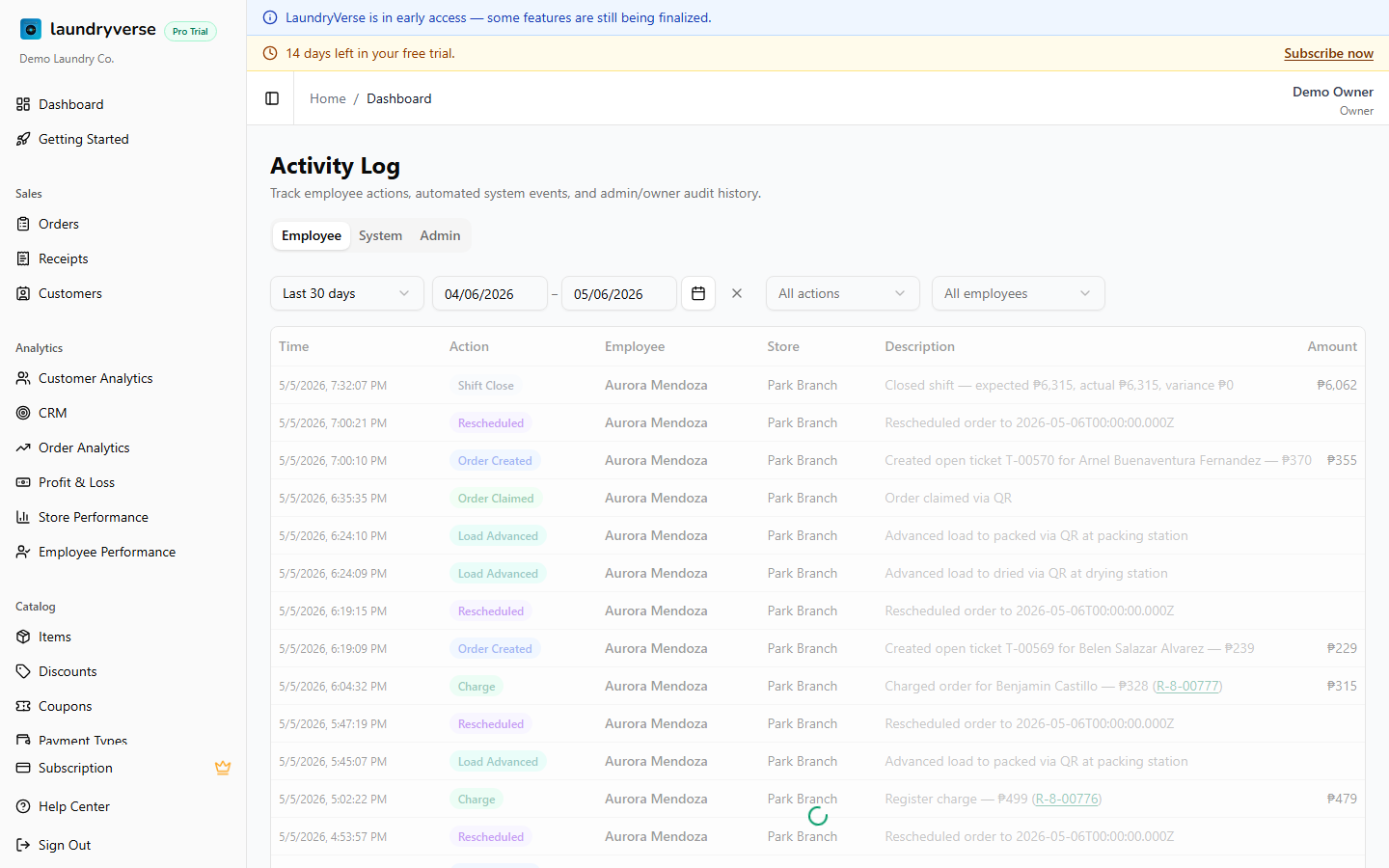
Each tab has its own filter bar:
| Filter | Where it applies | What it does |
|---|---|---|
| Date Range | All tabs | Calendar, preset or custom range. Default: last 30 days |
| Employee | Employee tab | Narrow to one cashier, useful for shift-by-shift review |
| Store | Employee + System | Set via the global Store filter in the top bar, which carries into Activity Log automatically |
| Category | Admin tab | Auth, Subscription, SMS, Settings, Data, Access |
| Actor | Admin tab | Owner (you), Employee, System, Admin (LaundryVerse support impersonation) |
The default 30-day window is rolling. Older entries are kept, just paged out by the date filter.
4. Reading a Row
Each tab uses a slightly different column layout, because they answer different questions.
Employee tab
| Column | What it shows |
|---|---|
| Time | When the action happened |
| Action | What was done: Shift Open, Pay-out, Receipt Cancel, Order Charge |
| Employee | Which cashier did it |
| Store | Branch the action belongs to |
| Description | One-line summary: Cancelled receipt #04231 |
| Amount | Peso amount when relevant (pay-in or pay-out, charge, refund) |
System tab
| Column | What it shows |
|---|---|
| Time | When the event fired |
| Category | SMS, Email, Push, Loyalty, Subscription |
| Title | The event: SMS Delivered, Loyalty Points Adjusted, Plan Renewed |
| Store | Branch the event belongs to (when applicable) |
| Details | Recipient, message ID, or other context |
| Status | Success, Error, or Skipped |
Admin tab
| Column | What it shows |
|---|---|
| Time | When the action happened |
| Category | Auth, Subscription, SMS, Settings, Data, Access |
| Action | The action: Sign-in, Plan Changed, Settings Updated |
| Actor | Owner, Employee, System, or Admin (LaundryVerse support impersonation) |
| Description | One-line summary |
| IP | Source IP, useful for confirming the sign-in came from your shop, not somewhere else |
| Status | Success or Failure |
Times are in your store's local timezone (set on each store). Multi-branch shops show times in the timezone of the store the action belongs to.
5. Important Notes
What this is not
- Not a way to undo actions. Cancelling a cancellation isn't a feature. Restore data by re-creating it (for example, ring the receipt up again at the POS).
- Not a way to delete entries. The log is append-only by design, which is what makes it trustworthy in a dispute.
- Not real-time chat. Entries appear within seconds, but use the Notifications screen on the POS for live operational signals.
Date range filter
The default 30-day window is just the picker default. Older entries aren't deleted, they're just out of view. Slide the date range back to investigate older incidents on any plan.
Export
The Activity Log doesn't have a CSV export today. Copy what you need manually for a dispute, or screenshot the row or rows for documentation. An export is planned for a future release.
Common issues
"A cashier can't open the Activity Log"
Cashiers don't have dashboard access by default, so the Activity Log is out of reach for them. If a trusted staff member needs to review it, give their role the Sign in to dashboard permission in Dashboard → Roles & Permissions. That grants the whole dashboard, not just this page.
"An action I expected isn't in the list"
Check that you're on the right tab. Cashier actions live under Employee, automated events under System, and owner or admin changes under Admin. Then widen the Date Range: the default only shows the last 30 days, so anything older is paged out until you slide the range back.
"The Employee tab is empty"
The Store filter in the top bar carries into this tab. If it's set to one branch, you only see that branch's cashier activity. Switch the global Store filter to All Stores, or pick a different branch, to see the rest.
"I can't find who changed a setting"
Settings and subscription changes are logged on the Admin tab, not Employee. Filter the Category to Settings or Subscription and check the Actor column to see whether it was the owner, a staff member, or LaundryVerse support during an impersonation session.
"I want to delete or edit an entry"
You can't, and that's intentional. The log is append-only so it stays trustworthy as evidence in a dispute. To correct a mistaken action, re-do the real action (for example, ring the receipt up again), which records a fresh, accurate entry.
What's next?
- Roles & Permissions: limit who can do high-risk actions before they show up in the log.
- Receipts: the Cancelled status here cross-references receipt cancellations.
- Reminders: reminder pause and resume actions show up under the Admin tab.
- Shift Reports: reconcile the pay-in and pay-out amounts that the Employee tab records.
Stuck? Email [email protected]. The founder reads every message.